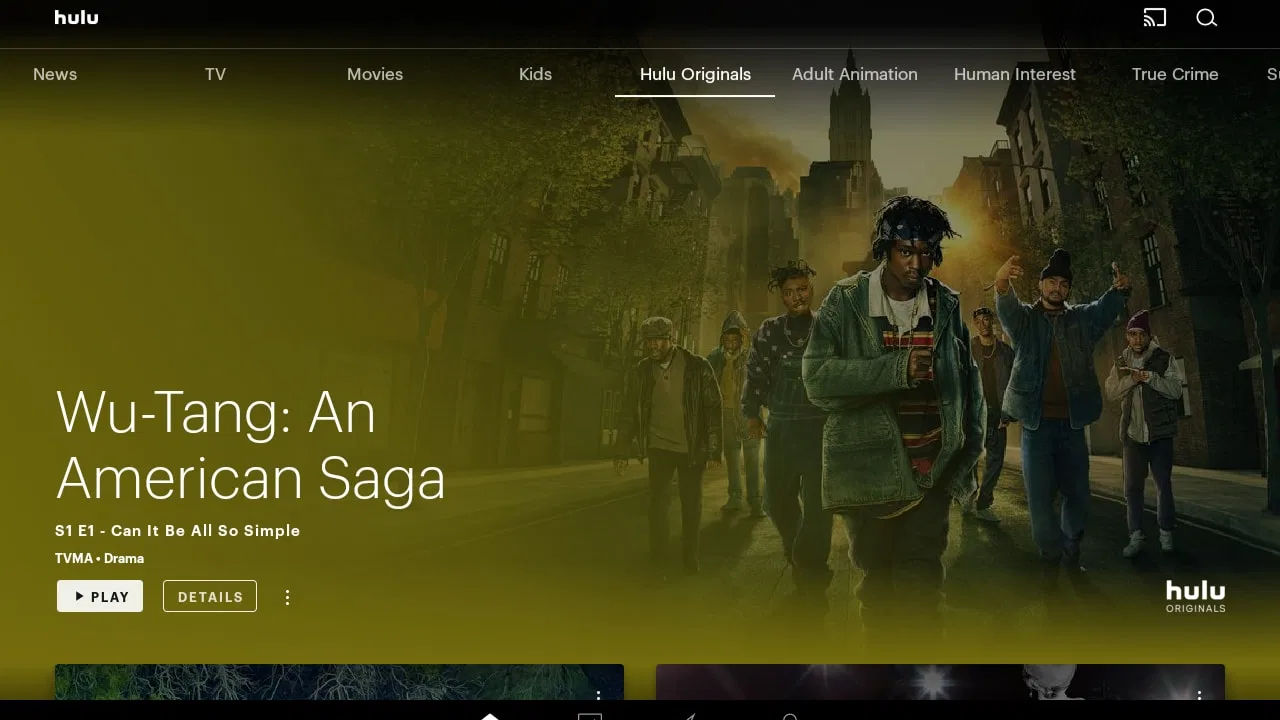
Hulu for Android TV
- 2.5
- Rating
- 10.00M
- Installs
- Free
- Price

 Analysis by App-foxy
Watching television through a streaming app can feel effortless when the connection is stable, but the real test begins when the network slows down, the household gets busy, or you move away from your usual setup. I spent time looking at Hulu for Android TV from that practical angle, and my impression is mixed: it is a familiar entertainment option from Disney, but the quality of the experience depends heavily on how reliably your device can reach the service.
Hulu is a free entertainment app with a Teen content rating, designed around discovering movies, watching TV shows, and accessing Hulu Originals. It has been available since October 24, 2014, and its Android version supports devices starting with Android 4.4. That broad compatibility sounds useful for older hardware, although Android TV performance can still vary depending on the television, streaming box, remote, and network rather than the operating system alone.
The app has passed the point of being a niche service: it has more than ten million installs. At the same time, its average rating is only about 1.9 from roughly 8,600 ratings, with around 2,800 written reviews. I would not treat that score as a complete verdict on the catalog, because streaming apps are often judged through a combination of content availability, account issues, playback reliability, device compatibility, and regional expectations. Still, it is a useful warning that the experience may not be equally smooth for everyone.
You May Also Like

 Google Keep - Notes and lists
Google Keep’s Quiet Growth Shows the Appeal of Simpler Notes
As mobile work gets busier, Google Keep keeps winning a simple contest: capture a thought quickly, find it later, and get on with the day.

 Blood Strike: 2.5 Anniversary
Blood Strike’s Loadouts Turn Every Drop Into a Tactical Gamble
A close look at Blood Strike’s custom loadouts: how fast access to signature weapons reshapes its battle royale rhythm, rewards preparation, and narrows the gap between fights.

 Pandora - Music & Podcasts
Pandora’s Music Is Easy to Start, but Harder to Recover
Pandora’s strength is its low-effort path from a seed to a station. Its weak spot is how much confidence it asks you to place in connection, setup, and quiet recovery.

 8 Ball Pool
 Is Built on Rivalries, Rematches, and Routine
A close look at the rivalries, rematches, shared routines, and unanswered safety questions that turn a quick pool match into a persistent mobile community.

 Samsung Music
’s Quiet Strength Is Playing What You Already Own
Its reach comes less from spectacle than from dependable access to a personal library. That simplicity is both the app’s strongest retention engine and its ceiling.

 AccuWeather: Weather Radar
AccuWeather Review: A Quick, Clear Forecast for Everyday Decisions
For everyday plans, the best forecast is the one you can understand quickly. AccuWeather makes rain timing, radar, and local conditions easy to act on, with a few trade-offs.
More From Our News Desk



How Hulu feels when the network is doing the heavy lifting
The strongest part of Hulu for Android TV is the simple living-room use case. I can imagine opening the app after dinner, browsing through available programs with a remote, and settling into a series without needing to connect a phone or manage a separate casting session. That direct television workflow is more comfortable than using a mobile app as the control center, especially when several people are choosing what to watch together.
Connectivity shapes almost every step. The home screen needs to load its artwork and program information, browsing depends on requests reaching the service, and playback needs a steady stream rather than a one-time download. When the connection is healthy, those steps fade into the background. When it is not, the app can feel slow before a video even begins, making the problem seem larger than a single buffering moment.
I find this distinction important when comparing Hulu with ordinary broadcast television or locally stored media. A television channel can still be available through its normal signal even if the home internet is having trouble, while a downloaded file does not need a live connection once it is on the device. Hulu belongs to the more flexible but more network-sensitive side of entertainment. Its advantage is access to a changing library through one interface; its trade-off is that the quality of the evening depends on the connection path.
On Android TV, the remote-friendly layout matters more than it would on a phone. A catalog can look attractive on a large screen, but repeated directional movement becomes tiring if categories are not easy to scan. I pay attention to whether I can move from discovery to playback without feeling lost, particularly when I am trying to find a specific show rather than browse endlessly. Hulu makes the most sense for viewers who enjoy choosing from a service library, not for someone who wants the fastest possible route from power button to one fixed channel.
Another practical point is that connectivity is not only about speed. A connection can be fast enough in general but still behave unpredictably because of wireless interference, a crowded household network, or a television placed far from the router. In that situation, a program may start normally and then become unreliable later. I would test the app during the time of day when the household actually watches, rather than assuming a quick daytime check represents the evening experience.
Why Android TV is convenient, and where it becomes restrictive
The television format is convenient for shared viewing because the screen and sound are already in place. I do not have to pass a phone around or worry about draining a mobile battery while a movie plays. That makes Hulu a reasonable choice for a family room, a bedroom television, or a secondary screen where the goal is relaxed viewing rather than active interaction.
The limitation is that the television is less forgiving when something goes wrong. On a phone, I can switch networks, move closer to a router, or continue with another task while a service recovers. On Android TV, I am usually sitting in front of the screen waiting for the interface or playback to respond. A small delay therefore feels more disruptive, especially when the remote offers fewer ways to diagnose the issue.
I would also separate the app from the catalog decision. Hulu is developed by Disney, but that does not mean every viewer will find the same selection equally useful. Someone drawn mainly to Hulu Originals may have a clear reason to install it. Someone who wants one universal destination for every movie and show may be disappointed by the normal limits of any single streaming library. I would compare the programs I actually plan to watch rather than choosing based only on the service name.
Using Hulu away from the ideal living-room setup
Although this review focuses on Hulu for Android TV, mobile situations reveal why network dependence matters. A phone or tablet can be more adaptable than a television because it can move between a home connection and a cellular connection. That flexibility can help when the main television is occupied or when I want to continue watching in another room, but it also introduces questions about signal strength and data use.
I would be cautious about treating a mobile connection as a guaranteed backup. Cellular coverage can change inside a building, and a stable browsing experience does not always translate into stable video playback. If I were using a phone as a temporary viewing screen, I would first check how the connection behaves for several minutes, especially before starting a longer program. A weak signal may turn a convenient alternative into repeated interruptions.
There is also a social difference between mobile and television viewing. A phone is good for a short personal session when I am waiting or traveling, while Android TV is better for a planned viewing block with comfortable sound and a larger picture. Hulu’s value changes with that context. I would choose the television app when the network is dependable and the viewing is shared; I would use a mobile device when flexibility matters more than screen size.
One useful habit is to avoid beginning a program at the exact moment the network is already under pressure. If other people are making video calls, playing online games, or streaming on additional screens, Hulu may have less room to maintain smooth playback. I cannot solve every network problem from inside the app, but I can reduce avoidable competition by pausing other heavy activities or moving the Android TV device to a more reliable connection point.
For people with strict mobile data limits, I would treat streaming as something to plan rather than something to leave running casually. A long session can consume much more data than a quick browse through the catalog, and the larger television screen can encourage longer viewing than intended. I would check the device and account settings available to me, watch over a trusted home connection when possible, and avoid assuming that a cellular connection is an invisible substitute for Wi-Fi.
What to do when playback fails
The most frustrating Hulu moments are not always total outages. A show may take longer to start, artwork may load unevenly, or playback may pause while the rest of the household internet appears normal. When that happens, I start with the basics: I check whether other services on the same Android TV device are responding, then I look at the home network and the television itself instead of immediately blaming the catalog or the account.
If other apps also struggle, the likely problem is broader than Hulu. Restarting the network equipment and the Android TV device can clear temporary connection or system problems, although I prefer to do this methodically rather than repeatedly pressing buttons. I first note whether the issue affects browsing, playback, or both. That small distinction helps me decide whether I am dealing with a network delay, an app response problem, or something specific to the selected program.
If Hulu alone is affected, I would close and reopen it, confirm that the device is still connected, and check whether the installed app is current. The app’s listed version is C59F39CFP3.10.33, but version information by itself does not guarantee identical behavior on every television. Older Android TV hardware can have its own limitations, so I would also consider whether the device has been struggling with other demanding apps or menus.
Recovery is easier when I avoid changing several things at once. If I restart the router, reinstall the app, change network settings, and switch accounts in one sequence, I may never learn what fixed the problem. My preferred order is simple: test another app, restart the affected device, reopen Hulu, and then investigate the home connection. If the problem continues only with Hulu, I would consult the service’s current support guidance rather than relying on old troubleshooting advice.
Account access is another part of the recovery experience. A streaming app can open correctly while a sign-in or subscription-related issue prevents viewing. I would verify that I am using the intended account and that the device is connected to the right network before assuming the application is broken. This is especially important on a shared television where another person may have previously used the device.
I also recommend keeping expectations realistic after a recovery step. If the app opens again but the network remains unstable, a temporary improvement may not last through a full episode. I would test playback for a while before settling in, particularly if the program is being watched with other people. That small pause can prevent the annoyance of restarting a film after interruptions have already spoiled the mood.
Making the connection work better for everyday viewing
My most useful data-conscious habit is to separate browsing from watching. I can spend a few minutes deciding what to play, then start one program instead of leaving the app open while repeatedly previewing titles. This reduces unnecessary network activity and makes the viewing decision less chaotic. It also helps when the connection is marginal, because I am not asking the device to load a large amount of catalog material while playback is trying to begin.
I would place the Android TV device where the home network reaches it reliably, especially if the television is in a room separated from the router by several walls. A wired connection can be preferable when the equipment supports it, but I would not assume every television or streaming device offers the same connection options. The practical goal is consistency, not chasing a theoretical maximum speed that the rest of the setup cannot maintain.
Shared networks deserve special attention. If Hulu is being used during a busy evening, I would look at what else is consuming bandwidth before changing the app. A second television, several phones backing up photos, or a large download can affect an otherwise adequate connection. Scheduling those activities outside the main viewing period may improve the experience without changing Hulu at all.
For mobile viewing, I would be more conservative. I would avoid starting a long session when the phone is already switching between weak signals, and I would check the operating system’s data controls so Hulu does not quietly become the largest consumer of a limited allowance. I would also remember that a phone’s battery can fall quickly during streaming, so a charger may be more important than a stronger speaker when planning a longer session.
One trade-off is that reducing data use can affect convenience or picture quality, depending on the controls available on the device and service. I would rather choose a sensible setting before leaving home than discover halfway through a journey that the connection is struggling. Because options can vary by platform and account, I would inspect the playback and device settings directly instead of assuming the Android TV version offers every control found elsewhere.
Another overlooked issue is household control. If several people share the television, a single person changing network or playback settings can affect everyone else. I would keep troubleshooting changes limited and reversible, and I would explain what I changed before handing the remote back. That sounds minor, but it prevents a later viewer from mistaking a temporary test setting for the normal setup.
My connectivity verdict on Hulu for Android TV
After looking at the app through these everyday situations, I see Hulu as a sensible choice for viewers who want a direct television streaming experience and already have a dependable home connection. The free download lowers the barrier to trying it, while the Teen rating makes it clear that it is not positioned as a children-only entertainment space. The Android 4.4 minimum also gives it a potentially broad device range, though I would still judge an older television by its actual responsiveness.
I would recommend it most strongly to someone who already knows that Hulu Originals or its television selection match their interests. That person can accept the network requirement because the catalog gives the app a clear purpose. It is also a good fit for a household that prefers watching on a shared screen and wants to use a remote instead of managing playback from a phone.
I would be less enthusiastic for someone with unreliable internet, a strict mobile data allowance, or a television that already struggles with modern streaming interfaces. In those cases, locally stored video, ordinary broadcast options, or a service that better matches the viewer’s existing setup may be more practical. I would also hesitate to recommend it as the only entertainment option for a household that expects every desired show and movie to be in one place.
The low average rating deserves attention, but I would read it alongside the app’s large installation base rather than treating either figure as the whole story. A streaming service can be widely installed and still frustrate people whose devices, accounts, or networks do not cooperate. My advice is to test it during your normal viewing hours, on the Android TV device you actually plan to use, and with the network conditions your household normally creates.
My final judgment is straightforward: Hulu for Android TV is convenient when connectivity stays out of the way, but it does not offer much protection from a weak or crowded network. The app works best as part of a reliable home setup, not as a guaranteed answer to every viewing situation. If your connection is steady and the Hulu catalog appeals to you, it is worth trying as a free entertainment app. If your priority is uninterrupted access regardless of internet conditions, I would choose a different kind of viewing solution.
The key trade-off is simple: Hulu makes discovery and shared streaming easy, but your network remains part of the viewing experience. That is the point I would keep in mind before installing it on an Android TV device, and it is why I would judge the app not only by its menus or available programs, but by how well it fits the connection, hardware, and viewing habits already in my home.
FAQs for Hulu for Android TV
01What features does Hulu offer on Android TV?
Hulu on Android TV provides access to a vast library of movies, TV shows, and Hulu Originals. Users can enjoy personalized profiles, allowing each member of the household to have their own recommendations and watch history. The app supports live TV streaming with premium networks and includes a cloud DVR feature for recording shows.
02Do I need a subscription to use Hulu on Android TV?
Yes, a subscription is necessary to access Hulu on Android TV. Hulu offers various plans, including options with or without ads, and a Live TV package. New users may benefit from a free trial to explore the platform before committing to a subscription plan that suits their viewing preferences.
03Can I download content to watch offline on Hulu for Android TV?
Currently, Hulu's offline download feature is not available on Android TV. This feature is limited to mobile devices like smartphones and tablets. However, users can stream content directly on Android TV with a stable internet connection, enjoying high-quality streaming without interruptions.
04Are there parental controls available on Hulu for Android TV?
Yes, Hulu offers parental controls to help manage what younger viewers can access. Users can create kid-friendly profiles, which restrict content to age-appropriate shows and movies. Additionally, parents can set up a PIN protection to prevent unauthorized access to adult profiles and restricted content.
05How can I troubleshoot streaming issues on Hulu for Android TV?
If you experience streaming issues on Hulu for Android TV, try restarting the app, your device, or checking your internet connection. Ensure the app and Android TV software are up-to-date. For persistent problems, clearing the app cache or reinstalling the app may help. Hulu’s support page offers further assistance if needed.
Pros
- User-friendly interface for easy navigation.
- Extensive library of shows and movies.
- Seamless streaming without buffering.
- Customizable user profiles available.
- Regularly updated with new content.
Cons
- Some titles not available offline.
- Ads included in lower subscription tiers.
- Limited 4K content available.
- Occasional login issues reported.
- May require additional plugins for live TV.

Hulu for Android TV
Gallery